Indulging in Design: How to Use the Chocolate Flavoured Font Without Making a Mess
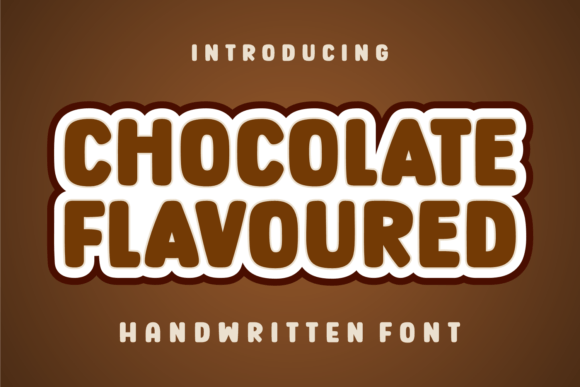
In the world of typography, few styles evoke an immediate sensory reaction quite like a script font inspired by sweets. Chocolate Flavoured is a delightful typeface that captures the essence of confectionery with its creamy curves and rich, flowing letterforms. For designers, small business owners, and hobbyists working within the dessert niche, this font offers a promise of instant charm. It feels perfect for dessert menus, bakery branding, and candy packaging. However, just as too much sugar can ruin a recipe, the misuse of a decorative font can ruin a design. If you are looking to incorporate this scrumptious script into your projects, there are several practical pitfalls you need to avoid to ensure your final product looks professional rather than messy.
Understanding the Appeal and the Nature of the Typeface
Before diving into the technical application, it is essential to understand what Chocolate Flavoured actually is. It is a display script font, meaning it is designed primarily for large headlines and logos rather than body copy. Its aesthetic relies on high-contrast thick and thin strokes that mimic the flow of melted chocolate or icing. This makes it a powerful tool for evoking emotion. It signals indulgence, warmth, and sweetness immediately.
However, many beginners make the mistake of treating decorative fonts like standard text fonts. They see the beauty of the letters and assume it can be used anywhere. This misunderstanding of font classification is the root of most design errors in this category. When you choose Chocolate Flavoured, you are choosing a specialized tool for a specific mood. It is not a workhorse font; it is the cherry on top of your design sundae.
Mistake #1: The Legibility Trap in Body Copy
The most common and damaging error designers make with Chocolate Flavoured is using it for paragraphs or small print. It is tempting to want a menu or a brochure to look entirely "sweet," but using a swirly script for descriptions makes the text nearly impossible to read.
The Impact on User Experience
When text becomes hard to read, the user stops reading. If a customer has to squint to figure out the price of a cupcake because the font is too ornate, they will become frustrated. In a commercial setting, this friction directly impacts sales. Furthermore, accessibility standards for the web require text to be legible; using Chocolate Flavoured for website paragraphs can actually hurt your SEO rankings because search engines penalize sites with poor user experience.
The Better Approach
Reserve Chocolate Flavoured strictly for headers, logos, or short callouts like "Happy Birthday." For the actual information—ingredients, prices, descriptions—pair it with a clean, sans-serif font like Montserrat or Open Sans. This contrast actually makes the script font stand out more, creating a hierarchy that guides the reader's eye naturally.
Mistake #2: Ignoring the "Chokehold" of Tight Spacing
Script fonts flow, and Chocolate Flavoured is no exception. A frequent oversight is failing to adjust the tracking (letter spacing) and leading (line spacing) after typing. By default, digital fonts often sit with standard spacing, which can make a connected script look disjointed or, conversely, too cramped.
Visualizing the Problem
Imagine the tail of the letter 'y' crashing into the letter 'o' in the next word. In a font designed to look like icing, this creates a visual blob rather than a smooth flow. This lack of negative space makes the design look amateurish and cluttered. It removes the "delightful" aspect and replaces it with visual noise.
How to Fix It
When setting your text in software like Adobe Illustrator or Canva, manually adjust the spacing. You want the letters to kiss, not crash. Ensure that the loops and swirls of Chocolate Flavoured have room to breathe. Additionally, increase the line height significantly compared to what you would use for Arial or Times New Roman. The ascenders and descenders (the tall loops and long tails) need vertical space to avoid colliding with lines above and below.
Mistake #3: The "Low Resolution" Download Disaster
Quality matters immensely in typography. A common mistake, particularly among hobbyists, is downloading Chocolate Flavoured from unverified sources that offer low-quality file formats or pirated versions. These files often contain errors in the vector data, leading to jagged edges when the font is scaled up.
The Cost of Cutting Corners
If you use a low-quality version of the font for a large banner or packaging print, the curves will look pixelated or "bumpy." Chocolate should be smooth; a jagged font mimics the look of cheap plastic rather than rich cocoa. This devalues your brand instantly. It suggests a lack of care and professionalism, which is fatal for a business selling high-end desserts.
The Solution
Always download Chocolate Flavoured from reputable foundries or authorized marketplaces. Check the file format—ensure it is a TTF or OTF file that supports high-resolution rendering. If you are using the font for commercial purposes, verify the license. A proper license ensures you are getting the full quality vector data and protects you legally.
Mistake #4: Mismatching the Context
While Chocolate Flavoured is perfect for a bakery, it is not a universal solution for all "sweet" themes. A misunderstanding occurs when creators force the font into contexts where it doesn't belong, such as a savory steakhouse menu trying to look "friendly," or a tech startup trying to be "soft."
Why Context Matters
Typography speaks a language. The swirls of Chocolate Flavoured speak of sweetness, femininity, and indulgence. If your brand is about rugged durability or high-tech precision, this font creates cognitive dissonance. Your audience will feel that something is "off," even if they can't articulate why. This disconnect breaks trust.
Better Decision Making
Evaluate your brand adjectives. If your keywords include words like artisan, sweet, homemade, indulgent, creamy, or celebratory, then Chocolate Flavoured is an excellent choice. If your keywords are fast, efficient, strong, or minimalist, look for a different typeface. Do not force a chocolate font into a minimalist design; it will always look cluttered.
Mistake #5: Lack of Contrast and Color Theory
Designers often want to use brown or dark colors for Chocolate Flavoured to keep the theme consistent. While logical, this often results in poor contrast, especially on dark backgrounds or textured paper.
The Visibility Issue
Because script fonts have thin strokes, they naturally have less visibility than bold block letters. If you print Chocolate Flavoured in dark brown on a chocolate wrapper with a slightly noisy texture, the text will disappear. The message is lost.
Practical Application
Ensure high contrast. If you are using a dark background, use a lighter color for the font, perhaps a cream or gold, to simulate the look of white chocolate or gold foil. If you are on a white background, a rich, dark cocoa brown works well, but ensure the stroke weight is heavy enough to be read from a distance. Always print a test proof before committing to a large batch of packaging.
Final Checks for Your Design
Before you finalize your project using Chocolate Flavoured, run through this quick checklist to ensure you have avoided the common pitfalls:
- Role Check: Is the font used only for headlines, logos, or short accents?
- Pairing Check: Is there a clean, legible sans-serif font for the body text?
- Spacing Check: Have you manually adjusted the tracking so letters don't collide?
- Resolution Check: Is the source file high-quality and properly licensed?
- Contrast Check: Is the text readable against the background color?
By treating Chocolate Flavoured