Integrating Reglarik: A Practical Guide to Stylish Typography in Modern Workflows
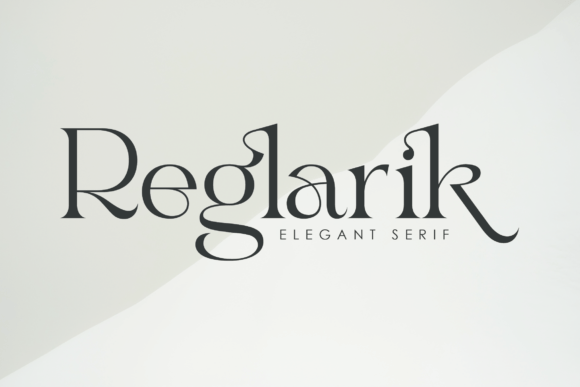
In the world of digital design and brand communication, typography is rarely just about making words readable; it is about establishing a voice. Reglarik, a stylish and modern serif font, offers a distinct solution for creators who need to balance contemporary aesthetics with classical elegance. Whether you are a freelance designer finalizing a logo, a marketer crafting a landing page, or a small business owner developing packaging, understanding how to integrate a specific typeface into your broader workflow is essential for efficiency and consistency.
This article explores the practical implementation of Reglarik, moving beyond its visual appeal to discuss how it functions within the ecosystem of design tools, client management, and brand development. We will examine how to leverage its unique features to create polished compositions without disrupting your production timeline.
The Role of Reglarik in Visual Hierarchy
Before downloading a new asset, it is helpful to define where it fits within your existing toolkit. Reglarik is best described as a transitional serif—it bridges the gap between the rigid formality of traditional serifs and the clean minimalism of sans-serifs. Its uniquely shaped characters and distinct charm make it particularly effective for display text, such as headers, titles, and pull quotes.
When planning a layout, consider the visual hierarchy of your project. If your body text requires high legibility at small sizes, Reglarik might serve best as a secondary font used for emphasis. Conversely, for high-end branding materials, such as wedding invitations or luxury product labels, it can function as the primary typeface. By defining its role early in the planning phase, you avoid the inefficiency of swapping fonts mid-project, a common bottleneck in design workflows.
Streamlining Production with PUA Encoding
One of the most significant workflow advantages of Reglarik is its PUA (Private Use Areas) encoding. In technical terms, this means the font includes special characters and ligatures that are not standard on a keyboard but are accessible without requiring specialized design software. For the end-user, this translates to a smoother execution phase.
Accessing Glyphs Without Friction
In a typical design process, accessing alternate characters often requires navigating complex OpenType panels in software like Adobe Illustrator or InDesign. While professional suites offer this control, many creators work across multiple platforms, including web-based builders like Canva, Squarespace, or Figma.
Because Reglarik is PUA encoded, you can often access its full glyph library through standard system character maps or simple copy-paste methods. This is particularly useful for:
- Web Builders: Implementing unique swashes on landing pages without writing custom CSS or JavaScript to trigger OpenType features.
- Social Media Managers: Creating distinct Instagram graphics or Pinterest pins that stand out in a feed, using the font directly within mobile or web apps.
- Document Creation: Enhancing presentations in Keynote or PowerPoint, where advanced typography settings are often limited.
This accessibility reduces the technical barrier to entry, allowing you to focus on the creative execution rather than troubleshooting font compatibility.
Practical Implementation in Brand Identity
When building a brand, consistency is the currency of trust. Integrating Reglarik effectively requires more than just liking the way it looks; it requires a strategy for its application across different assets.
Defining Usage Rules
If you decide to adopt Reglarik for a project, establish clear usage rules during the mood boarding phase. For instance:
- Primary Usage: Define if Reglarik is for Headlines only or if it extends to Sub-headers.
- Pairing: Select a complementary sans-serif font for body text. Because Reglarik has a distinct charm, it pairs well with neutral, geometric sans-serifs that do not compete for attention.
- Context: Decide where the ornate ligatures should be used. Overusing the stylistic alternates can make text difficult to read. A practical rule is to use standard characters for navigation menus and save the swashes for hero text or feature titles.
By codifying these rules in a simple style guide (even a one-page document), you ensure that whether you are the one designing the asset or outsourcing it to a contractor, the visual output remains consistent.
Workflow Integration: From Concept to Completion
Understanding how Reglarik interacts with your software environment is key to maintaining momentum. The font is designed to be versatile, but every tool handles typography slightly differently.
The Design Phase
In vector-based software like Illustrator, you have full control over the kerning and ligatures of Reglarik. This is the ideal environment for logo design or print layouts where precision is required. Here, you can manually adjust the spacing between the unique character shapes to ensure optical balance.
The Development Phase
For web developers, integrating Reglarik involves ensuring that the font files are correctly optimized for web use to prevent slow page load times. While the font is visually rich, modern web formats (like WOFF2) compress this data efficiently. However, it is good practice to test the rendering of the font across different browsers, as some may interpret the serif curves differently, particularly on mobile devices with lower resolution screens.
The Content Creation Phase
For writers and content marketers, the focus is often on application rather than design. If you are using Reglarik in a blogging platform, check how the font renders in long-form reading environments. A stylish serif can enhance the reading experience by adding a touch of sophistication, but if the x-height is too low or the contrast too high, it may cause eye strain. Testing the font on a sample blog post before committing to a site-wide change is a prudent step in your quality control process.
Optimizing for Efficiency and Quality Control
Every asset added to a project carries a "maintenance cost." If a font is difficult to manage, it slows down the team. Reglarik mitigates this through its ease of use, but there are still best practices to follow.
Font Management
Keep your font library organized. Install Reglarik in your system font manager (like Font Book on Mac or a third-party manager like RightFont) rather than relying on application-specific installs. This ensures the font is available across all your creative tools, from email marketing platforms to slide decks, without needing to reinstall it for each application.
Compatibility Checks
Before sending a file to a printer or a client, always outline your fonts or embed them in the PDF. While Reglarik is widely compatible, font substitution errors can occur if the recipient does not have the font installed. This is a standard step in the design process, but it is often overlooked in fast-paced workflows.
Conclusion
Reglarik is more than just a collection of letters; it is a tool for communication that requires thoughtful integration. By understanding its technical capabilities—specifically its PUA encoding—and defining clear usage guidelines, you can incorporate this modern serif into your workflow to enhance your brand's visual appeal. Whether you are designing a high-end magazine layout or a simple social media graphic, treating typography as a strategic component of your process will lead to more polished, professional, and effective outcomes.