Mountain: The Art of Using a Handwritten Font with Professional Grace
In the world of digital design, the search for the perfect typeface often feels like a quest for the "holy grail." We look for something that captures emotion, conveys authenticity, and stands out from the rigid grid of standard sans-serifs. Enter Mountain, an elegant and classic handwritten font that promises to deliver a personal, organic touch to your projects. Whether you are a freelancer crafting a logo, a bride-to-be designing invitations, or a small business owner curating a social media feed, the allure of a flowing, calligraphic script is undeniable.
However, the bridge between a beautiful font file and a professional design is often riddled with subtle pitfalls. Many creators, from hobbyists to seasoned marketers, download a script font like Mountain and immediately run into trouble. The result is often a design that looks cluttered, illegible, or amateurish. The issue usually isn't the font itself, but rather a misunderstanding of how to handle the unique characteristics of handwritten typography.
The Legibility Trap: When "Beautiful" Becomes "Unreadable"
The most common mistake users make with elegant scripts is prioritizing aesthetic over function. Mountain is designed with fluid strokes and artistic flair, which makes it stunning at large sizes. However, when you shrink that same font down to 10-point text for a product description or a lengthy blog post, the design collapses. The delicate swashes and loops that look charming on a wedding banner become a visual headache on a paragraph of body copy.
This error affects your communication more than you might realize. If your audience has to squint to read your headline because the letters are too ornate, they will simply scroll past. The primary goal of text is to be read. Mountain should be treated as a display font—a typeface meant for headlines, logos, and short, impactful statements. For your body text, pair Mountain with a clean, highly legible sans-serif or serif font. This contrast not only ensures readability but also highlights the elegance of the script by giving the eye a place to rest.
The Spacing Nightmare: Understanding Kerning and Overlap
One of the defining features of a classic handwritten font like Mountain is its flow. The letters are often designed to connect, mimicking the natural movement of a pen on paper. While this creates a seamless look, it introduces a technical challenge that beginners often overlook: spacing.
If you type out a phrase using Mountain without adjusting the tracking (the uniform space between letters), you will likely encounter a frustrating issue. Some letters might crash into each other, creating dark, unreadable clumps of ink. Conversely, other combinations might appear to have a gaping hole between them. This happens because standard digital spacing doesn't always account for the irregular slant and curves of calligraphy.
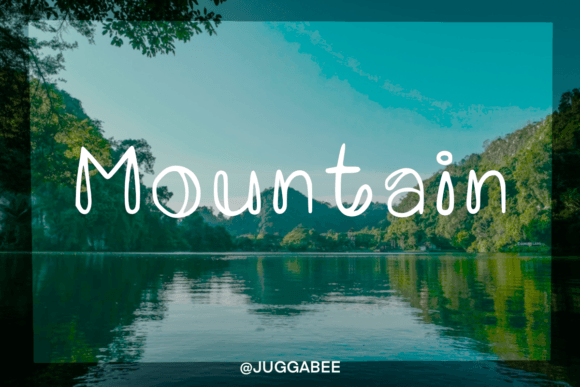
The Solution: You must be willing to manually kern your text. This means adjusting the space between individual pairs of letters. In software like Adobe Illustrator or Canva (Pro), you can isolate the "M" and the "o" in "Mountain" and nudge them closer together until they visually connect without overlapping awkwardly. Do not rely on the computer’s default settings. Taking the extra five minutes to perfect the spacing separates a novice designer from a professional.
The "One-Font-Fits-All" Misconception
Another frequent error is the assumption that a single font can carry an entire brand identity. I have seen entrepreneurs try to use Mountain for their logo, their headers, their body text, and their call-to-action buttons. This creates a monotonous design that lacks hierarchy.
Visual hierarchy is how you guide a viewer’s eye through your design. If everything is written in a swirling script, nothing stands out. Mountain is excellent for adding a human touch, but it needs structure around it. Think of Mountain as the accent wall in a room—it adds personality, but if you paint every wall that color, the room becomes overwhelming.
A better approach is to use Mountain for high-impact elements: your main logo, a "Welcome" message, or specific quote highlights. Then, choose a secondary font for your sub-headers and a tertiary font for your main paragraphs. This creates a sophisticated, layered look that feels professional rather than chaotic.
Context and Appropriateness: Matching the Vibe
While Mountain is versatile enough for social media posts and stationery, it is not a universal solution for every industry. A common mistake is forcing a handwritten font into a context where it feels out of place. For example, using an elegant script for a construction company’s invoice or a cybersecurity firm’s landing page might send mixed signals about the brand's stability and seriousness.
Before you commit to Mountain for a project, ask yourself: Does this font match the emotional weight of the message? Mountain excels in industries related to beauty, lifestyle, weddings, food, and boutique retail. It conveys warmth, care, and artisanal quality. If your brand is built on precision, data, and industrial strength, you might find that Mountain undermines your credibility, no matter how pretty it looks.
Technical Checks Before You Download
Before purchasing or downloading a font like Mountain, there are technical specifications you must verify. Many users download a font only to find that it doesn't support their specific language or software.
- Character Set: Does the font include numbers and punctuation? Many script fonts skimp on these, leaving you with a beautiful letter "A" but a generic, mismatched number "1" that breaks the design.
- File Format: Ensure the font comes in TTF (TrueType Font) or OTF (OpenType Font) format for maximum compatibility with both Mac and Windows.
- License Type: This is crucial. A "Personal Use" license is not the same as a "Commercial Use" license. If you use a free version of Mountain on a t-shirt you sell, you could face legal issues. Always check if the license covers your specific medium (e.g., print-on-demand, web embedding).
Mastering the Alternates
Finally, many users miss out on the full potential of Mountain because they don't explore the OpenType features. High-quality handwritten fonts often come with "alternates"—different versions of the same letter. If you type the word "Happy" and the two "p"s look identical, it looks fake. Real handwriting varies.
By accessing the glyphs panel in your design software, you can swap out a standard "p" for a stylistic alternate. This small tweak makes the text look genuinely hand-lettered. If you skip this step, your design risks looking like a template rather than a custom creation.
Conclusion
Mountain is a tool that offers immense creative potential. It can transform a bland social media graphic into a work of art and give a generic wedding invite a sense of timeless elegance. But like any powerful tool, it requires respect and skill. By avoiding the traps of illegibility, poor spacing, and misuse of context, you ensure that your design communicates exactly what you intend: quality, care, and style. Don't just install the font; learn to wield it.