Grenade: Mastering the Raw Power of This Dry Marker Brush Font
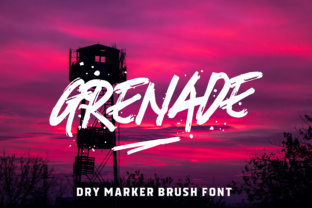
In the crowded world of typography, finding a font that genuinely captures a human element can be a game-changer. Grenade is a distinct dry marker brush font celebrated for its strong, natural, hand-drawn aesthetic and rough texture. It is not just a typeface; it is a visual statement that brings energy and authenticity to a project. Whether you are designing for t-shirts, crafting bold headlines, creating eye-catching posters, or developing merchandise, Grenade offers a raw, organic feel that digital-perfect fonts often lack. However, like any specialized tool, its effectiveness relies entirely on how you use it. Many designers and creators purchase this font with high hopes, only to be disappointed by the results because they misunderstood its nature or applied it incorrectly.
The Common Trap of Over-Design
The most frequent mistake beginners and even seasoned professionals make with Grenade is treating it like a standard sans-serif or serif font. Because Grenade has a "rough touch" and a hand-drawn quality, it comes with built-in visual texture. A critical error is layering this font over highly complex or textured backgrounds. If you place Grenade over a busy photograph or a grunge texture without sufficient contrast or separation, the text becomes illegible. The rough edges of the letters blend into the background noise, turning your headline into a visual mess.
This affects the usability and communication of your design immediately. If the audience has to squint to read the message, the design fails, regardless of how "cool" the font looks. The better approach is to treat Grenade as the focal point. It works best when it has breathing room. Use solid colors, subtle gradients, or simple backgrounds that allow the unique character of the brush strokes to stand out. For t-shirt designs, consider the fabric color carefully. A dark, textured font like Grenade needs a light, solid fabric to ensure the "hand-drawn" effect reads as an artistic choice rather than a printing error.
Understanding the "Dry Marker" Aesthetic
There is a distinct difference between a "wet" ink brush font and a "dry" marker style. Grenade falls into the latter category. A wet brush font usually has smooth, flowing connections and varying line widths that mimic calligraphy. Grenade, conversely, mimics the friction of a felt tip on paper. It is gritty, uneven, and intentionally imperfect.
A misunderstanding here leads to inappropriate pairing. Many users try to pair Grenade with elegant, thin serif fonts or highly technical monospaced fonts. This clash of styles creates a disjointed visual hierarchy. The roughness of Grenade demands a companion font that is clean, simple, and modern, but not overly delicate. A sturdy sans-serif or a clean grotesque font usually pairs well. The goal is to let Grenade do the heavy lifting for the "vibe" of the design, while the secondary font handles the finer details with clarity.
Technical Pitfalls: Scaling and Spacing
One of the overlooked technical aspects of using Grenade is how it behaves at different scales. Because it is a brush font with rough edges, it can suffer from "aliasing" or visual clutter when used at very small sizes. If you try to use Grenade for body text or long paragraphs, the rough texture will make the text shimmer and vibrate, causing eye strain for the reader. This is a usability disaster.
Practical Advice: Reserve Grenade for headlines, sub-headers, and display text. It is designed to be impactful at large sizes where the brush texture can be appreciated. When you scale it up for a poster or a merchandise mockup, you may notice that the default letter spacing (kerning) is too tight. Brush fonts often collide when placed too close together. Do not accept the default spacing. Take the time to manually adjust the kerning. Pushing the letters apart slightly ensures that the rough edges of each character don’t overlap, maintaining legibility while preserving that raw, explosive energy.
Evaluating Licensing and File Quality
Before you commit to using Grenade for a commercial project—especially for merchandise like t-shirts or mugs—you must verify the licensing. A common mistake is assuming that a free download version is licensed for commercial use. Many versions of popular fonts found on aggregator sites are for personal use only. Using them on products you sell can lead to legal issues and unexpected costs down the line.
Furthermore, check the file format. A high-quality version of Grenade should come with OpenType (OTF) or TrueType (TTF) features. If you are working with a web version, ensure you have the WOFF files. A high-quality file set often includes stylistic alternates or ligatures—special character variations that prevent repetitive letters (like two 'o's in "boom") from looking identical. This feature is crucial for maintaining the authentic, hand-drawn illusion. If every letter looks exactly the same, the font looks mechanical rather than natural.
Color and Application Strategy
When applying Grenade to merchandise or branding, color choice is paramount. Avoid using thin, light-colored strokes of Grenade on a dark background if the resolution is low. The "dry" nature of the font means there are gaps in the ink. On a screen, this looks like texture. On a low-quality print, this can look like a defect or a faded print job.
A better approach for print is to use a solid, opaque fill color. If you are screen printing a t-shirt, ensure the mesh count is appropriate for the detail level of the font. For digital use, such as social media graphics, ensure the resolution is high enough (300 DPI for print, 72-150 PPI for web) to capture the nuance of the brush strokes.
Final Checks Before You Launch
Before finalizing any design featuring Grenade, step back and view it from a distance. This is the "squint test." If you squint and the text blurs into an unreadable blob, you have too much texture competing for attention.
Ask yourself these questions:
- Readability: Can a stranger read this from five feet away?
- Context: Does the roughness of the font match the message? (Grenade is great for energy, sports, and streetwear, but perhaps less suitable for a luxury spa brochure).
- Cleanliness: Is the background clean enough to let the font shine?
Grenade is a powerful asset in a creator's toolkit, offering a vibe that polished fonts cannot replicate. By respecting its texture, pairing it wisely, and ensuring technical quality, you can avoid the common pitfalls that lead to messy designs. Use it with intention, and it will add that explosive, human touch your projects need.