Why Manic Streets Is More Than Just a Fancy Script Font
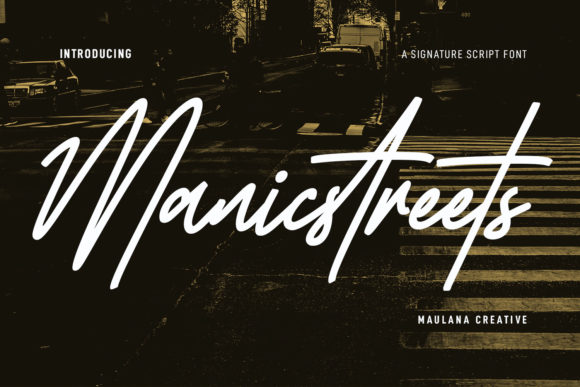
Finding a typeface that feels personal yet professional is a challenge many designers and creators face. You want something with flair, something that breaks away from the rigid geometry of standard sans-serifs, but you also need something that remains legible and versatile. This is where Manic Streets enters the conversation. It is a fancy signature super slanted script font that promises to bring a dynamic, handwritten touch to your projects. With its regular strokes, fun characters, ligatures, and alternates, it is designed to look stunning on everything from wedding invitations to business logos.
However, the excitement of downloading a new font often leads to hasty decisions. Many users see the beautiful swashes in the preview and assume the font will work perfectly in every context. The reality is that script fonts, particularly those with a strong slant and stylistic flair like Manic Streets, require a more thoughtful approach. If you treat it like a standard body text font, you will likely end up with a design that looks cluttered, illegible, or unprofessional. Understanding the specific characteristics of this font is the first step toward using it effectively.
The Trap of Overusing Stylistic Alternates
One of the most common mistakes when using Manic Streets is overusing the stylistic alternates and ligatures. Because the font comes with a rich set of features—fun characters and swashes—it is tempting to activate every stylistic option available. This often results in a text block that looks more like a tangled vine than readable typography. While these features are excellent for adding personality, they should be used as accents, not as the foundation of your entire text.
Consider a scenario where you are designing a logo for a coffee shop. You want the name to feel warm and inviting, so you choose Manic Streets. If you use the heavily embellished version of the initial capital letters and connect them with complex ligatures, the logo might look artistic on a large screen, but it will likely turn into a blob of ink on a business card or a mobile app icon. The "super slanted" nature of the font means it already has high energy; adding too many decorative elements can push the design from "stylish" to "chaotic." The better approach is to use the standard characters for the main wordmark and perhaps apply a stylistic alternate only to the first letter to create a focal point without sacrificing clarity.
Context is King: Matching Font to Medium
Another frequent oversight is failing to evaluate the medium before applying the font. Manic Streets is described as looking stunning on wedding invitations and thank you cards, and this is true. The handwritten touch adds a level of intimacy and elegance that suits formal stationery. However, the needs of a wedding invitation are vastly different from the needs of a website header or an infographic.
When you use this font for long-form text or in small sizes, the "regular strokes" mentioned in its description become critical. While they are regular, the slant and the connecting nature of cursive scripts can make individual letters blur together at small resolutions. For example, if you are a blogger trying to use Manic Streets for your paragraph text to give your site a "personal journal" feel, you will likely frustrate your readers. The eye strain caused by reading continuous slanted script text is real. A better approach is to reserve this font for pull quotes, headers, or accent text where its unique character can shine without hindering the user experience.
Understanding the "Super Slant" and Spacing
The defining feature of Manic Streets is its "super slant." This gives the font a sense of speed and forward motion, making it excellent for dynamic designs like event posters or modern greeting cards. However, this aggressive angle can create awkward spacing issues if not managed correctly. Beginners often overlook kerning—the spacing between individual characters. In a heavily slanted script, certain letter combinations (like "o" followed by "n" or "a" followed by "t") can appear to have too much white space or can collide in odd ways.
Imagine you are creating a quote graphic for social media. The quote reads, "Art is freedom." If you type this out in Manic Streets without adjusting the tracking or kerning, the word "Art" might look disjointed due to the high crossbar of the 'A' and the slant of the 'r'. The result is a disconnect that breaks the fluid, handwritten illusion. Always take the time to manually adjust the spacing between specific characters. Most design software allows you to place your cursor between letters and use shortcut keys to tighten or loosen the space. This small step ensures that the "handwritten touch" actually looks like it was written by a steady hand rather than a shaky one.
Color and Contrast Considerations
When working with a font that has a "regular stroke" but high style, contrast is your best friend. A mistake often seen in consumer design is pairing Manic Streets with low-contrast colors or busy backgrounds. Because the font relies on its slant and character shapes to convey meaning, it needs room to breathe. Placing white text in this font over a light grey or pastel background will cause the details of the ligatures to disappear.
Similarly, placing the font over a photograph with high detail (like a forest or a crowd) without a background overlay is a recipe for illegibility. The "fun characters" of the font can easily get lost in the visual noise of an image. The corrective approach here is to use solid, contrasting colors or to place a semi-transparent shape behind the text. For instance, if you are using Manic Streets for a "Thank You" card overlay, ensure the background image is slightly blurred or darkened so the white script pops clearly. This preserves the elegance of the font while ensuring the message is actually readable.
Licensing and Technical Checks
Before you commit to using Manic Streets for a commercial project, such as a logo for a client or merchandise you intend to sell, you must verify the licensing details. This is a step many freelancers and small business owners skip, leading to legal headaches later. Just because a font is available for download doesn't mean it is free for commercial use. Even if you purchased it, the license might restrict the number of "seats" (computers) it can be installed on or the type of merchandise it can be printed on.
Furthermore, check the technical file format. Ensure you are installing the correct version (such as .OTF or .TTF) that supports the OpenType features you want to use. If you install a basic version, you might not have access to those ligatures and alternates that make the font special. Always read the documentation provided with the font files. It will tell you how to access the special characters, which usually requires software that supports OpenType features, like Adobe Illustrator or Photoshop, rather than basic text editors.
Final Thoughts on Making the Right Choice
Choosing Manic Streets is a great decision if you are looking to inject energy and a personal signature into your work. It is a tool that excels in specific scenarios—branding, invitations, and accent typography. However, like any specialized tool, it performs best when used with intention and care. Avoid the temptation to over-decorate, pay attention to your spacing, and respect the medium you are designing for. By understanding the nuances of this fancy signature script, you can avoid the common pitfalls that make designs look amateurish. Instead, you will create polished, professional pieces that truly capture the handwritten charm you were aiming for.