Hightfull: Why This Handwritten Brush Script Font Deserves More Than a Quick Glance
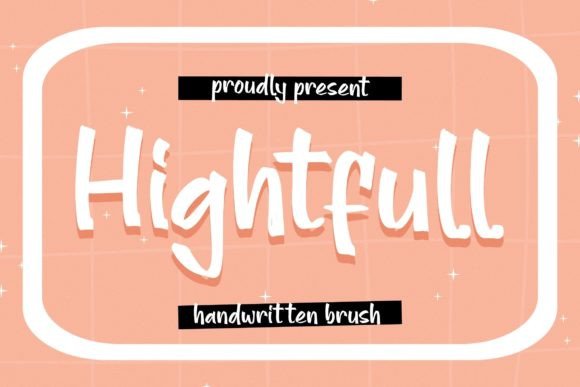
At first look, Hightfull feels like a breath of fresh air. It’s a handwritten brush script font with the charming, organic texture of something scribbled on a whiteboard or marker board. You can almost smell the dry-erase ink. For greeting cards, invitations, motivational quotes, and social media graphics, it seems like the perfect choice to inject personality and warmth. But here’s the thing many creators learn the hard way: a font that looks effortless in a preview can become a frustrating puzzle in your actual project if you don’t understand its quirks.
The Allure and the Oversight: What Hightfull Really Is
Let's be clear about what makes Hightfull special. It’s not just another script font. Its defining characteristic is that marker-board authenticity. The strokes have a natural, slightly uneven flow, mimicking the pressure and angle of a real marker. This isn't a polished, formal calligraphy; it's friendly, approachable, and full of human imperfection. That’s its superpower. For a blogger creating a quote graphic or a small business owner designing a thank-you card, this font can instantly convey sincerity and a personal touch.
The mistake many make is treating it like a standard serif or sans-serif font. You install it, type your sentence, and expect it to just work. But Hightfull, like many expressive script fonts, has a personality that requires a little cooperation. Ignoring this leads to designs that look either messy or, ironically, less authentic than intended.
Mistake #1: Overlooking Context and Readability
The most common error is using Hightfull for long blocks of text or critical information. Imagine a wedding invitation where the date, time, and venue are all in this flowing script. It might look beautiful in a headline, but as body text, it can strain the eye. The very imperfections that give it character become obstacles to quick comprehension.
The Better Approach: Use Hightfull strategically. Let it shine for headlines, short phrases, or call-to-action text like "Thank You" or "You're Invited." Pair it with a clean, highly readable sans-serif font for essential details. For example, "Save the Date" in Hightfull, followed by the actual date and location in a simple font like Lato or Open Sans. This maintains the aesthetic while ensuring your message is clear.
Mistake #2: Ignoring Kerning and Ligatures
Script fonts live and die by their connections. When you type "Th" or "fl," the letters should link smoothly. If they don't, you get awkward gaps or collisions that break the handwritten illusion. Beginners often don’t realize these features need to be enabled in their design software (like Adobe Illustrator, Photoshop, or even Canva Pro).
The Better Approach: Before finalizing any design, zoom in and check the spacing between letter pairs. In your software’s character panel, look for options like "Standard Ligatures" and ensure they are turned on. Don’t be afraid to manually adjust the kerning (the space between two specific letters) for a perfect, flowing connection. This small effort makes the difference between a font that looks typed and one that feels genuinely written.
Mistake #3: Choosing the Wrong Color and Background
Pairing Hightfull with a busy, textured background or a low-contrast color scheme is a recipe for disaster. The delicate, textured strokes can get lost in the noise, turning your elegant message into a visual jumble. Similarly, using a very light color on a white background will make it nearly invisible.
The Better Approach: Give Hightfull room to breathe. Use it on clean, solid-color backgrounds—a soft pastel, a rich navy, or a classic white. Ensure strong color contrast; a dark charcoal or deep ink color often works beautifully. For a marker-board feel, consider a very subtle, light gray paper texture as your background, but keep it minimal. The font should be the star, not competing for attention.
Practical Checks Before You Commit
Before you download or purchase Hightfull for a project, run through this quick checklist. It will save you time and ensure your final product looks professional.
- Test the Specific Glyphs: Don’t just type "Hello." Type the full alphabet, numbers, and common punctuation. Check if the lowercase 'e' loops nicely, if the 's' has a pleasing curve, and if numbers like '2' and '5' are distinct. Look for alternate characters (stylistic alternates) that might offer more variety.
- Check the License: This is crucial. Is Hightfull available for commercial use with your download or purchase? Many free font sites offer personal-use licenses only. Using it on a product you sell or for client work without the proper license can lead to legal issues. Always verify the terms.
- Consider the Pairing: Have a secondary font in mind. Look at previews of Hightfull paired with simple geometric sans-serifs or elegant serifs. See how they interact. A good pairing elevates both fonts.
- Assess Scalability: How does it look at a very small size, like on a business card? How about blown up on a poster? The marker texture should remain appealing at different scales, but it’s wise to test.
Beyond the Basics: Getting the Most from Hightfull
Once you’ve mastered the basics, you can start playing with its strengths. Use it to add a personal signature to digital products, like an ebook cover or a course module title. It’s fantastic for creating social media quote images that stand out in a feed. For educators, it can make a worksheet or a classroom poster feel more engaging and less sterile.
Remember, the goal isn’t to use Hightfull everywhere, but to use it where it adds genuine value. It’s a tool for adding a specific flavor of authenticity and warmth. By avoiding the common pitfalls—prioritizing readability, fine-tuning the typography, and choosing the right context—you can harness its unique character to create designs that don’t just look good, but feel right. Your messages, from the heartfelt to the motivational, will carry that extra touch of human sincerity that only a well-executed handwritten font can provide.